What is HTML?
HTML stands for HyperText Markup Language.
It is the main language used to make and organize content on websites.
HyperText Markup Language (HTML) is a computer language that is used to create web pages.
It tells the web browser what to show, how it should look, and how it should be arranged on the screen when you open a website.
HyperText:
This means links that connect one web page to another. (Like clicking from one article to another.) वह टेक्स्ट जो एक वेब पेज को दूसरे वेब पेज से जोड़ता है
Markup Language:
HTML uses tags (like <p>, <h1>, <div>, etc.) to describe parts of a web page, such as: Headings, Paragraphs, Links and more.
🎯 Example 2: Title Tag with Redirect
What is Web Browser?
A web browser is a software that allows us to view websites on the internet.
It fetches (gets) HTML documents from the web, understands (interprets) them, and displays them as web pages on the screen.
वेब ब्राउज़र एक सॉफ्टवेयर होता है जो हमें इंटरनेट पर वेबसाइटें देखने की सुविधा देता है।
यह वेब से HTML डॉक्यूमेंट्स को लाता है, उन्हें समझता है (interpret करता है), और उन्हें स्क्रीन पर वेब पेज के रूप में दिखाता है। Some popular web browsers that support HTML5 are:

Structure of HTML Document
An HTML document contains two basic parts: HEAD and the BODY. The head section contains information about the document, such as title. The body section contains the actual text, images, and everything alse that is displayed on the web page.
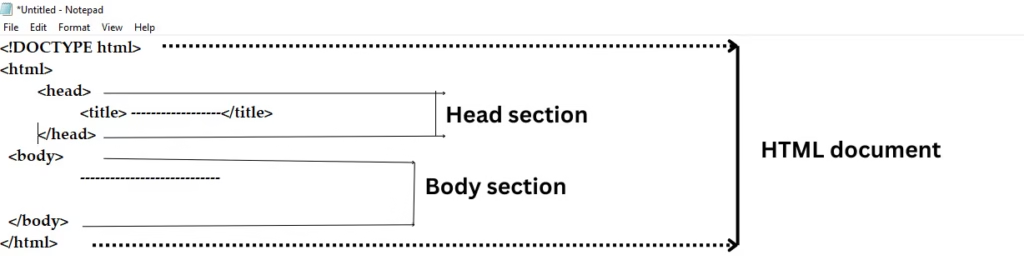
- <DOCTYPE html> : <DOCTYPE html> is a declaration that tells the web browser that the document is written in HTML5. It helps the browser display the web page correctly by using the latest HTML standards. It must be at the top of the document. एक डिक्लेरेशन (घोषणा) है जो वेब ब्राउज़र को बताता है कि यह वेब पेज HTML5 में लिखा गया है। यह ब्राउज़र को पेज को सही तरीके से दिखाने में मदद करता है यह हर HTML डॉक्युमेंट की सबसे पहली लाइन होनी चाहिए। यह सभी ब्राउज़रों में पेज को एक जैसा दिखाने के लिए ज़रूरी है।
- <html> The
<html>tag is a container tag that identifies the document as an HTML document.
An HTML document starts with<html>and ends with</html>.
Everything written inside these tags is considered part of the HTML content.
The browser reads everything between the opening and closing<html>tags.<html>टैग एक कंटेनर टैग है जो यह पहचान करता है कि यह डॉक्युमेंट एक HTML डॉक्युमेंट है। - <head> tag: The <head> tag is a container tag that contains the information about documents, including its title, script used, style definition, and document descriptions. The <head> tag is nested between the <html> tags.
<head>टैग एक कंटेनर टैग है जो डॉक्युमेंट से जुड़ी जानकारी को रखता है, जैसे कि उसका शीर्षक (title), स्क्रिप्ट (script), स्टाइल की परिभाषा (style definition) और डॉक्युमेंट का विवरण (description)। - <title> tag: The <title> tag ia a container tag that sepecifies the title of a web page. The <title> tag is nested between the opening and closing <head> tags. The title specified inside <TITLE> tag appears on the browsers’ title bar.
- <BODY> Tag: The <body> tag is a container tag that encloses all the tags and content to be displayed on the web page. The <body> tag is entered below the closing </head> tag and above the closing </html> tag.
How to create, save, open, edit, and view HTML documents?
Creating and saving HTML Documents
To create and save HTML documents using Notepad:
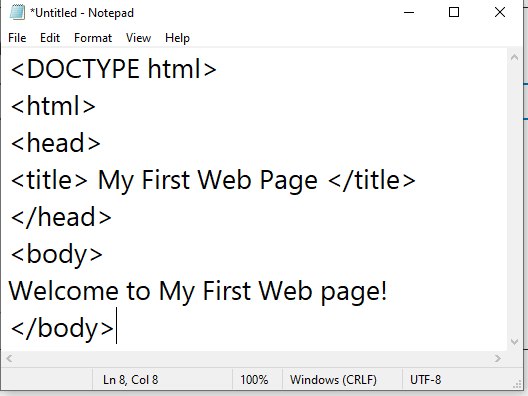
- Open Notepad and type the code
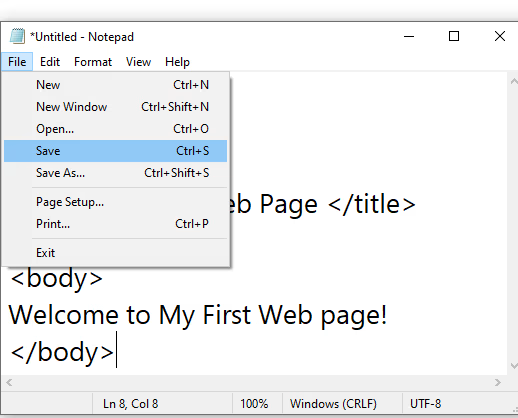
- In the File menu, click the save options.
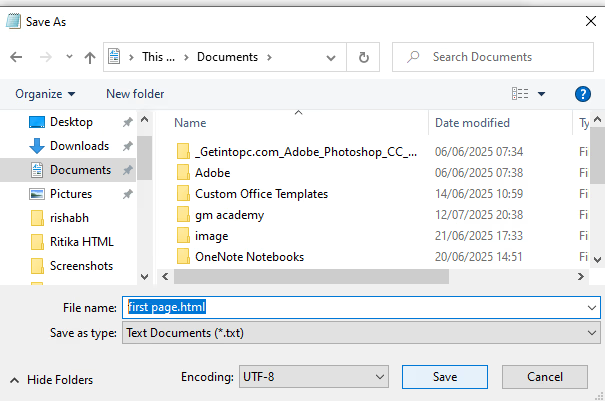
- In the File box, type a name for the document with the extension .html
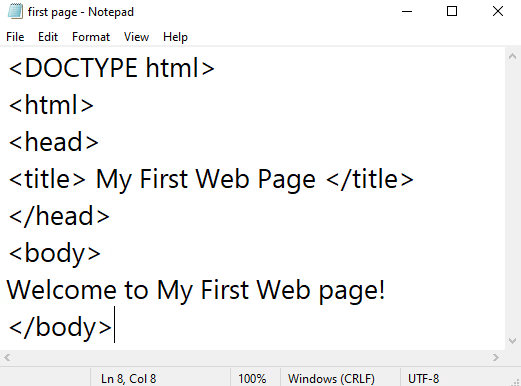
- Click the save button. (Notepad saves the document and its name is displayed on the Title bar).